LIVE FLEET OPERATIONS CONSOLE

See your entire fleet.
Spot problems sooner.

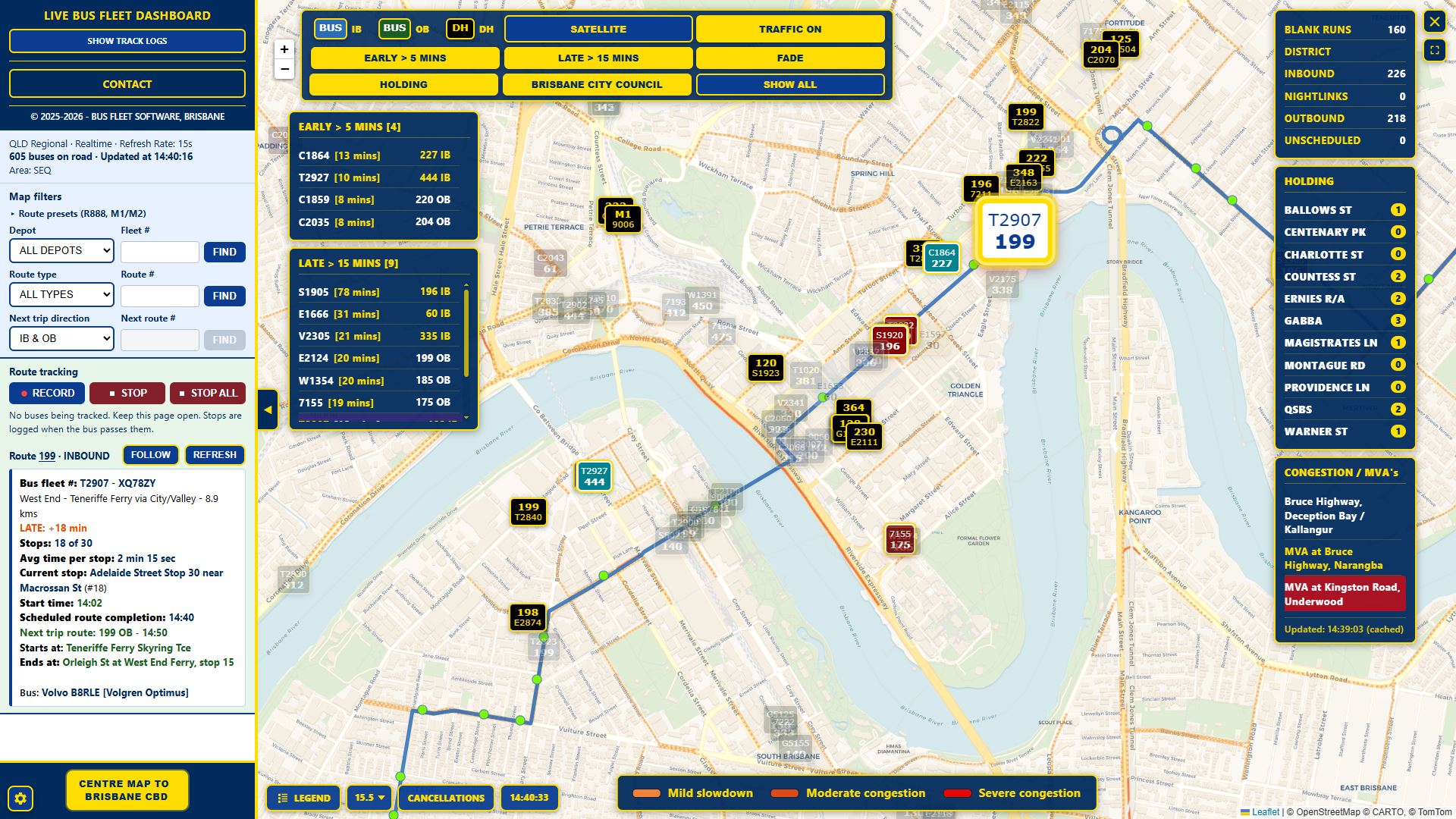
Monitor live vehicle positions, late and early running, dead-head movements, holding areas and network incidents from one operational screen—updated approximately every 15 seconds.

Built for bus control centres, depot counters and dispatch teams.

Live fleet view • GTFS-Realtime • Select image to enlarge

Know what is happening across the fleet

Bring reporting vehicles, route information and operational exceptions together on one map. Find the bus you need, assess the situation and act without searching through multiple screens.

  • In-service, dead-head and depot-bound vehicles
  • Official GTFS route colours and live trip information
  • Authorised access with settings retained per workstation

Turn live fleet data into faster decisions

01

See the whole operation

View reporting vehicles across the network, including services, blank runs and next-route allocations.

02

Find exceptions quickly

Bring late, very late and early services to the foreground with configurable thresholds and FADE mode.

03

Respond with context

Follow individual buses and assess holding areas, severe congestion and new accident alerts on the map.

04

Create useful records

Track shifts, route changes and stop passage status, then produce summaries and PDF reports.

The operational detail is there when you need it

Live map and search

  • Route and fleet number displayed on each bus
  • Find and centre by fleet or route number
  • Inbound, outbound and dead-head status coding
  • Terrain, satellite and selectable zoom views

Filters and allocations

  • Depot, blank run, district, school and NightLink filters
  • Next-route allocation search by route and direction
  • Live category counts and status isolation
  • Collapsible controls for a clearer map

Performance and follow

  • Late and early lists driven by schedule variance
  • Click-to-centre from exception lists
  • Configurable early and late thresholds
  • Vehicle detail, mini-map and continuous FOLLOW mode

Holding areas and incidents

  • Live vehicle counts within configurable geofences
  • Show, hide, pin and centre holding locations
  • Major-road congestion and accident panel
  • Optional traffic overlay and fresh-incident alerts

Tracking and reporting

  • Track one or multiple selected buses
  • Stop-passage logs with on-time status
  • Route-change highlighting and session summaries
  • PDF exports and hourly fleet snapshots

Settings and access

  • Preferred thresholds, zoom and operating area
  • Agency and fleet selection
  • Workstation-specific browser settings
  • Secure authorised-key access and feed retry

Designed around real public transport data

Console builds have been developed for Queensland, New South Wales and Auckland, with broader Australian and New Zealand network support under development. Availability depends on suitable GTFS schedule and GTFS-Realtime feeds.

Request a tailored demonstration

We can demonstrate the Console around your fleet, control-room priorities and available data feeds.